Getting Started
From sign-up to a live rescue website in just a few minutes. This guide walks you through every step.
Sign Up
Head to fosterflow.app/signup and create your account. You'll need:
- Your organization's name
- A subdomain for your rescue's public site (e.g., happypaws.fosterflow.app)
- Your email address and a password
After submitting, your application is reviewed and your account is provisioned — usually within a few hours. You'll get an email once you're ready to go.
The Setup Wizard
When you log in for the first time, FosterFlow walks you through a 5-step setup wizard. Each step only takes a minute or two.
Don't worry about getting everything perfect right now. You can change any of these settings later from your admin panel.
Your Dashboard
Once setup is complete, you'll land on your admin dashboard. This is your home base — a quick overview of everything happening at your rescue.
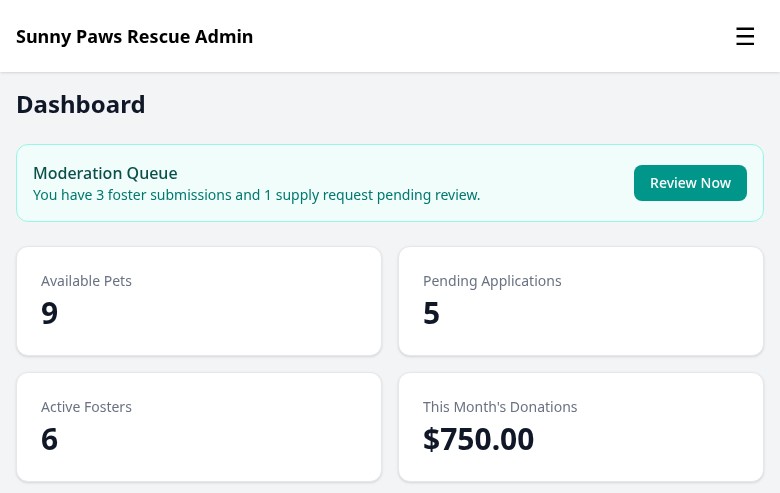
The admin dashboard gives you an at-a-glance view of your rescue's activity.
The dashboard shows you:
- Current pet counts by status (available, fostered, adopted)
- Pending applications that need your attention
- Recent activity across the system
- Quick links to add a new pet or review applications
The left sidebar gives you access to every section of FosterFlow. We'll cover each one in the other guides.
Your Public Site
Right away, your rescue has a fully functioning public website at your subdomain. Visitors can browse available pets, read about your organization, fill out applications, and donate — all without you building anything.

Your public home page is ready immediately — no design work required.
The public site automatically reflects your rescue's branding and only shows pets marked as "available." As you add pets and update their status in the admin, your public site updates in real time.
Next Steps
You're all set up! Here's what most rescues do next: