Applications & Adoptions
Manage every application that comes in — adoption, foster, volunteer, and surrender — from a single organized queue.
Reviewing Applications
Go to Admin → Applications to see your full applications queue. New submissions land here automatically — no email digging required.
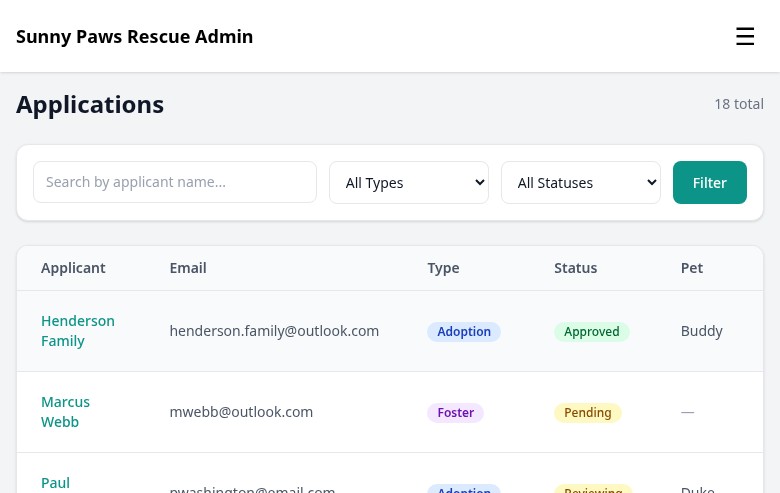
The applications queue shows all incoming submissions, filterable by type and status.
You can filter by application type (adoption, foster, volunteer, surrender) and by status. Click any application to open the full submission — every question and answer the applicant provided, along with their contact info.
From the application detail view, you can change the status, add internal notes, or generate a contract if you're approving an adoption.
Application Types
FosterFlow includes four built-in application types. You can enable or disable each one from your settings:
For people who want to permanently adopt a pet. Links to a specific animal and includes questions about home environment, experience, and references.
For people who want to temporarily care for an animal. Can be submitted for a specific pet or as a general foster interest application.
For people who want to help your rescue in other ways — transport, events, fundraising. Not linked to a specific animal.
For pet owners who need to surrender an animal to your rescue. Collects info about the pet and the reason for surrender.
You can customize the questions on each form type from Admin → Settings → Applications.
Status Workflow
Every application moves through a simple status workflow. You update the status manually as you work through applications.
Status changes are logged with a timestamp so there's always a clear audit trail. Changing a status does not automatically send an email to the applicant — you'll do that separately.
Home Visit Notes
On any application, you can add private internal notes — these are never visible to the applicant. Use them to record home visit observations, reference check results, or reminders for your team.
Notes are timestamped and attributed to the staff member who added them. Your whole team can see the notes on an application, making it easy to hand off reviews without losing context.
Adoption Contracts
When you approve an adoption application, FosterFlow can generate a pre-filled adoption contract as a PDF. The contract pulls in the adopter's info, the pet's details, and your rescue's standard terms.
From the approved application, click Generate Contract. You can preview the contract before downloading, and it includes a signature line for the adopter.
The contract template is set up by default, but your rescue's specific language and policies can be customized from Admin → Settings → Contracts. If you need significant customization, reach out to support and we can help.